24. Spring Cloud Feign
24.1. 介绍
Feign是一个声明式的Web Service客户端,它的目的就是让Web Service调用更加简单。Feign提供了HTTP请求的模板,通过编写简单的接口和注解,就可以定义好HTTP请求的参数、格式、地址等信息。Feign会完全代理HTTP请求,开发时只需要像调用方法一样调用它就可以完成服务请求及相关处理。开源地址:https://github.com/OpenFeign/feign。Feign整合了Ribbon负载和Hystrix熔断,可以不再需要显式地使用这两个组件。总体来说,Feign具有如下特性:
- 可插拔的注解支持,包括Feign注解和JAX-RS注解;
- 支持可插拔的HTTP编码器和解码器;
- 支持Hystrix和它的Fallback;
- 支持Ribbon的负载均衡;
- 支持HTTP请求和响应的压缩。
Spring Cloud Feign致力于处理客户端与服务器之间的调用需求,简单来说,使用Spring Cloud Feign组件,他本身整合了Ribbon和Hystrix。可设计一套稳定可靠的弹性客户端调用方案,避免整个系统出现雪崩效应。
我们现在将使用Spring Netflix Feign Client实现一个使用REST的Web应用程序。
将Feign视为Spring RestTemplate使用接口与endpoints进行通信。 该接口将在运行时自动实现,而不是使用服务URL地址,而是使用服务名称。
24.2. 依赖
设置Feign Client项目,我们将在其pom.xml中添加spring-cloud-starter-feign依赖:
1 2 3 4 | <dependency>
<groupId>org.springframework.cloud</groupId>
<artifactId>spring-cloud-starter-feign</artifactId>
</dependency>
|
Feign客户端位于spring-cloud-starter-feign软件包中。 要启用它,我们必须使用@EnableFeignClients注解。 要使用它,我们只需使用@FeignClient(“ service-name”)注解一个接口,然后将其自动连接到控制器中即可。
创建此类Feign客户端的一种好方法是使用@RequestMapping注解方法创建接口,并将其放入单独的模块中。 这样,它们可以在服务器和客户端之间共享。 在服务器端,可以将它们实现为@Controller,而在客户端,可以将其扩展和注解为@FeignClient。
此外,spring-cloud-starter-eureka软件包需要包含在项目中,并通过使用@EnableEurekaClient注解主应用程序类来启用。
24.3. Feign Client
如果没有Feign,我们将不得不将EurekaClient的一个实例自动连接到我们的控制器中,通过该实例我们可以接收一个以service-name命名的服务信息作为Application对象。根据此对象获取该服务的所有实例的列表,选择一个合适的实例,然后使用此实例获取主机名和端口。 这样,我们可以对任何http客户端发出标准请求。
下面的例子演示使用Feign访问RestFul API.
- 使用@EnableFeignClients注解,启用 Feign Client
1 2 3 4 5 6 7 8 9 10 11 12 13 14 15 | package com.ibm.training.demo;
import org.springframework.boot.SpringApplication;
import org.springframework.boot.autoconfigure.SpringBootApplication;
import org.springframework.cloud.openfeign.EnableFeignClients;
@EnableFeignClients
@SpringBootApplication
public class DemoApplication {
public static void main(String[] args) {
SpringApplication.run(DemoApplication.class, args);
}
}
|
使用此注解,我们扫描所有声明为Feign客户端的组件。
- 使用@FeignClient注解声明为Feign客户端
1 2 3 4 5 6 7 8 9 10 11 12 13 14 15 16 17 18 19 20 | package com.ibm.training.demo.client;
import java.util.List;
import org.springframework.cloud.openfeign.FeignClient;
import org.springframework.web.bind.annotation.PathVariable;
import org.springframework.web.bind.annotation.RequestMapping;
import org.springframework.web.bind.annotation.RequestMethod;
import com.ibm.training.demo.model.Post;
@FeignClient(value = "jplaceholder", url = "https://jsonplaceholder.typicode.com/")
public interface JSONPlaceHolderClient {
@RequestMapping(method = RequestMethod.GET, value = "/posts")
List<Post> getPosts();
@RequestMapping(method = RequestMethod.GET, value = "/posts/{postId}", produces = "application/json")
Post getPostById(@PathVariable("postId") Long postId);
}
|
- Post 类
1 2 3 4 5 6 7 8 9 10 11 | package com.ibm.training.demo.model;
public class Post {
private String userId;
private Long id;
private String title;
private String body;
// get 和 set 方法
}
|
- 使用 JSONPlaceHolderClient
1 2 3 4 5 6 7 8 9 10 11 12 13 14 15 16 17 18 19 20 21 22 23 24 25 | package com.ibm.training.demo.service;
import java.util.List;
import org.springframework.beans.factory.annotation.Autowired;
import org.springframework.stereotype.Service;
import com.ibm.training.demo.client.JSONPlaceHolderClient;
import com.ibm.training.demo.model.Post;
import com.ibm.training.demo.service.JSONPlaceHolderService;
@Service
public class JSONPlaceHolderService{
@Autowired
private JSONPlaceHolderClient jsonPlaceHolderClient;
public List<Post> getPosts() {
return jsonPlaceHolderClient.getPosts();
}
public Post getPostById(Long id) {
return jsonPlaceHolderClient.getPostById(id);
}
}
|
24.4. 自定义配置
Spring Cloud为每个命名客户端创建一个默认FeignClientsConfiguration类的配置定义集,根据需要,我们可以自定义该类,如下所述。
上面的类包含以下bean:
Decoder – 解码器,ResponseEntityDecoder,包装SpringDecoder,用于解码Response
Encoder – 编码器,SpringEncoder,用于编码RequestBody
Logger – Slf4jLogger是Feign使用的默认日志类
Contract – SpringMvcContract,提供注解处理
Feign-Builder – HystrixFeign.Builder用于构造组件
Client – 客户端,LoadBalancerFeignClient或默认的Feign客户端
24.4.1. 自定义Bean配置
如果要自定义一个或多个这些bean,可以使用@Configuration类覆盖它们,然后将其添加到FeignClient注解中:
1 2 3 4 5 6 7 8 9 10 11 12 13 14 15 16 17 18 19 20 21 22 23 24 25 26 27 28 29 30 31 32 33 34 35 36 37 38 | package com.ibm.training.demo.config;
import feign.Logger;
import org.springframework.context.annotation.Bean;
import org.springframework.context.annotation.Configuration;
import feign.RequestInterceptor;
import feign.codec.ErrorDecoder;
import feign.form.ContentType;
import feign.okhttp.OkHttpClient;
@Configuration
public class ClientConfiguration {
@Bean
public Logger.Level feignLoggerLevel() {
return Logger.Level.FULL;
}
@Bean
public ErrorDecoder errorDecoder() {
return new ErrorDecoder.Default();
}
@Bean
public OkHttpClient client() {
return new OkHttpClient();
}
@Bean
public RequestInterceptor requestInterceptor() {
return requestTemplate -> {
requestTemplate.header("user", "murphy");
requestTemplate.header("password", "abc123");
requestTemplate.header("Accept", ContentType.URLENCODED.toString());
};
}
}
|
在此示例中,我们告诉Feign使用OkHttpClient而不是默认值,以便支持HTTP/2。
Feign支持针对不同用例的多个客户端,包括ApacheHttpClient,该客户端随请求发送更多的Header头,例如某些服务器期望的Content-Length。 为了使用这些客户端,请不要忘记将所需的依赖项添加到我们的pom.xml文件中,例如:
1 2 3 4 5 6 7 8 9 | <dependency>
<groupId>io.github.openfeign</groupId>
<artifactId>feign-okhttp</artifactId>
</dependency>
<dependency>
<groupId>io.github.openfeign</groupId>
<artifactId>feign-httpclient</artifactId>
</dependency>
|
24.4.2. 使用属性文件配置
24.4.3. Interceptors
Feign提供的另一个有用的功能是添加拦截器。 拦截器可以对每个HTTP请求/响应执行从身份验证到日志记录的各种隐式任务。
因此,在下面的代码段中,我们声明一个请求拦截器,该拦截器将基本身份验证添加到每个请求:
1 2 3 4 5 6 7 8 | @Bean
public RequestInterceptor requestInterceptor() {
return requestTemplate -> {
requestTemplate.header("user", username);
requestTemplate.header("password", password);
requestTemplate.header("Accept", ContentType.APPLICATION_JSON.getMimeType());
};
}
|
24.5. Feign with Eureka
上面的例子是单独介绍Feign的使用,用的是URL的配置。在Eureka中,我们可以根据name来识别示例,进而调用接口服务。
- 参照教程中的Spring Cloud Eureka章节内容,分别搭建好Eureka server和Eureka Client服务;
- 搭建spring-cloud-eureka-feign-client示例。具体代码如下:
1 2 3 4 5 6 7 8 9 10 | package com.example.trainingeurekafeign.controller;
import org.springframework.cloud.openfeign.FeignClient;
import org.springframework.web.bind.annotation.RequestMapping;
@FeignClient("spring-cloud-eureka-client")
public interface GreetingClient {
@RequestMapping("/greeting")
String greeting();
}
|
- 这里使用@FeignClient的name进行适配 Web API。
- 值”spring-cloud-eureka-client”对应Eureka Client实例中的spring.application.name。
1 2 3 4 5 6 7 8 9 10 11 12 13 14 15 16 17 18 19 | package com.example.trainingeurekafeign.controller;
import org.springframework.beans.factory.annotation.Autowired;
import org.springframework.context.annotation.Lazy;
import org.springframework.web.bind.annotation.GetMapping;
import org.springframework.web.bind.annotation.RestController;
@RestController
public class GreetingController {
@Autowired
@Lazy
private GreetingClient greetingClient;
@GetMapping("/get-greeting")
public String greeting() {
return greetingClient.greeting();
}
}
|
- 注入接口GreetingClient,然后调用它的方法。
1 2 3 4 5 6 7 8 9 10 11 12 13 14 15 | package com.example.trainingeurekafeign;
import org.springframework.boot.SpringApplication;
import org.springframework.boot.autoconfigure.SpringBootApplication;
import org.springframework.cloud.openfeign.EnableFeignClients;
@SpringBootApplication
@EnableFeignClients
public class TrainingEurekaFeignApplication {
public static void main(String[] args) {
SpringApplication.run(TrainingEurekaFeignApplication.class, args);
}
}
|
- @EnableFeignClients 这个注解的作用是启动Feign Client。
1 2 3 4 5 6 7 8 9 | spring.application.name=spring-cloud-eureka-feign-client
server.port=8080
eureka.client.serviceUrl.defaultZone=${EUREKA_URI:http://localhost:8761/eureka}
ribbon.ReadTimeout=5000
ribbon.ConnectTimeout=5000
ribbon.MaxAutoRetries=0
info.app.name=${spring.application.name}
|
- ribbon的配置主要是解决Feign timeout的问题。
- 成功部署后,仪表板显示如下。

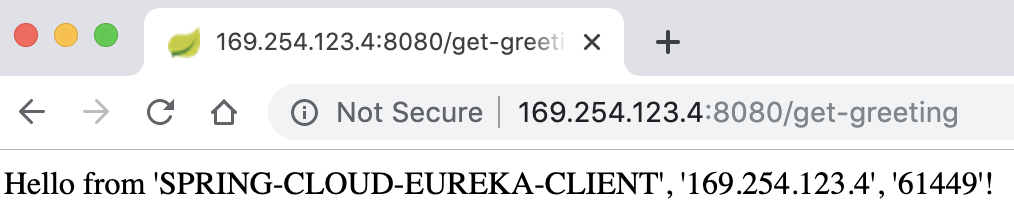
- 浏览器中访问其中的spring-cloud-eureka-feign-client示例,显示如下: